

Features
Everything AQS does at the counter and behind it
Each area is built around batches, expiry dates and a record of who did what. Where a capability needs a higher plan, it says so.
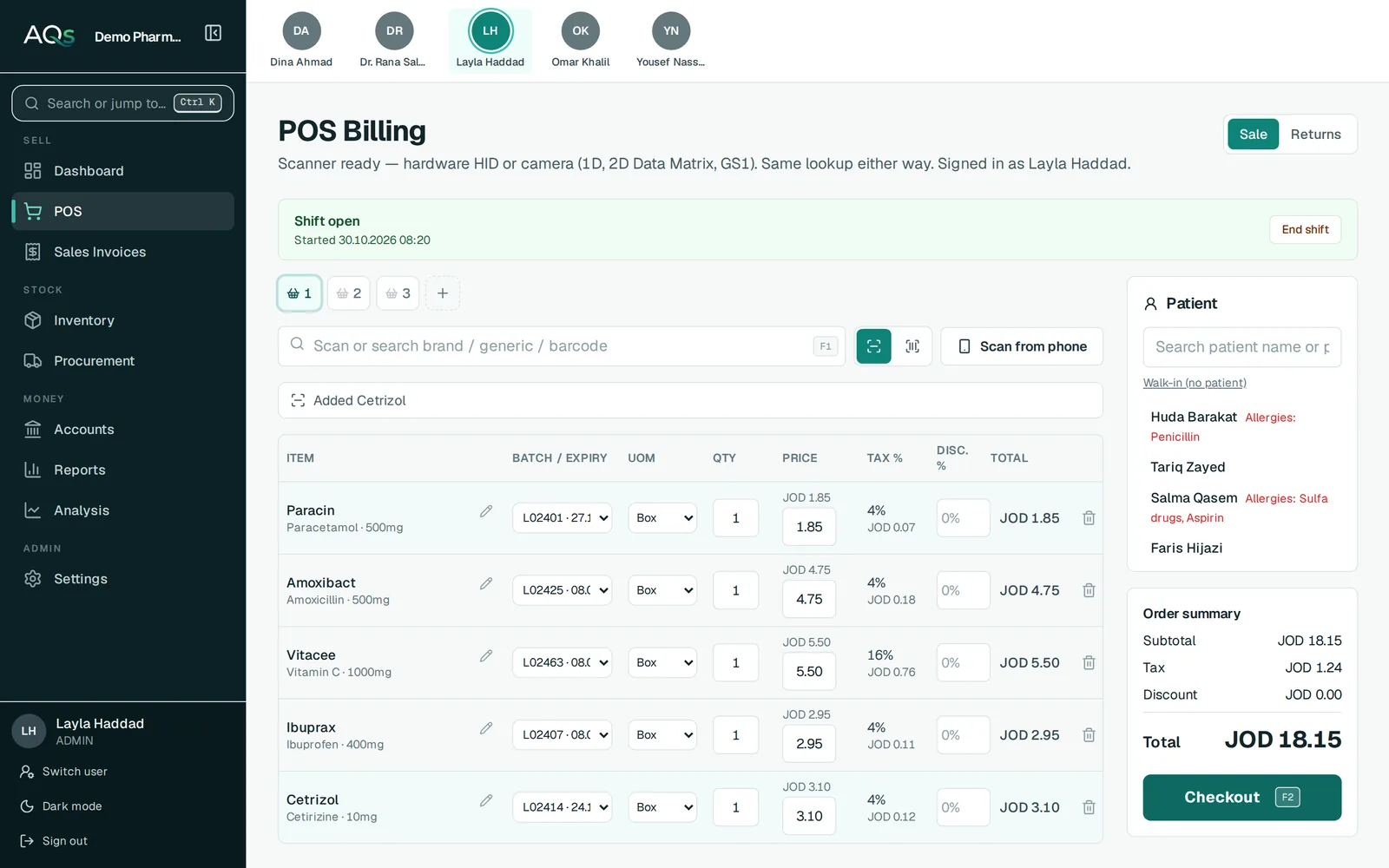
Point of sale & clinical safety
A fast counter that checks the patient and the batch before the sale is final.
- Earliest expiry sells first
- Box or single tablet
- Any barcode scanner
- Webcam and phone scanningPro: Available in Pro and up
- Allergy and duplicate warnings
- Split payments
- Returns against the invoice
- Shifts and drawer countPro: Available in Pro and up
- Batch promotionsNew
- SubstitutesNew
- Sales to other pharmaciesNewPro: Available in Pro and up
- Receipts your wayNew
Details: Point of sale & clinical safety
- Earliest expiry sells first
- Sells the earliest-expiring batch first. Quarantined, blocked, expired and zero-stock lots are never offered, and picking a different lot is recorded.
- Box or single tablet
- Sell a box or a single tablet. Past sales keep the pack size they were sold with, so later edits don't rewrite history.
- Any barcode scanner
- USB and Bluetooth scanners for 1D, GS1 Data Matrix, Aztec, PDF417 and QR codes. GS1 codes fill in the product, expiry and lot.
- Webcam and phone scanning
- Scan with a webcam, or use a phone on the same Wi-Fi as the counter's scanner.
- Allergy and duplicate warnings
- If a patient's recorded allergy matches an item, a warning appears that can't be dismissed; only users with the override permission can continue. Adding the same generic twice raises a duplicate-therapy warning.
- Split payments
- Split one sale across cash, card, insurance and customer account. Insurance can be an amount or a percentage, and on-account sales stop at the customer's credit limit.
- Returns against the invoice
- Find the invoice, return up to what was sold, and the refund is split back across the original payments. Stock is restored only for the restock reason.
- Shifts and drawer count
- Open and close a shift and compare the counted drawer with the calculated cash. The variance is stored and reported.
- Batch promotions
- Put a fixed price or a percentage off one batch, usually one near expiry. The counter applies it automatically and the promotion ends when the batch sells out, expires or reaches its end date.
- Substitutes
- For an item, list products with the same ingredient, strength and dosage form that are in stock here or at another branch, with the price difference and nearest expiry. The pharmacist decides.
- Sales to other pharmacies
- Flag a corporate account as a pharmacy and sell to it at cost-based prices with a markup, VAT on top, on account or by cash and card, with its own tax invoice.
- Receipts your way
- Choose paper size, language, logo, footer and copies with a live preview. Print silently to a chosen printer, or print an A4 tax invoice with the buyer's details.
Inventory & expiry
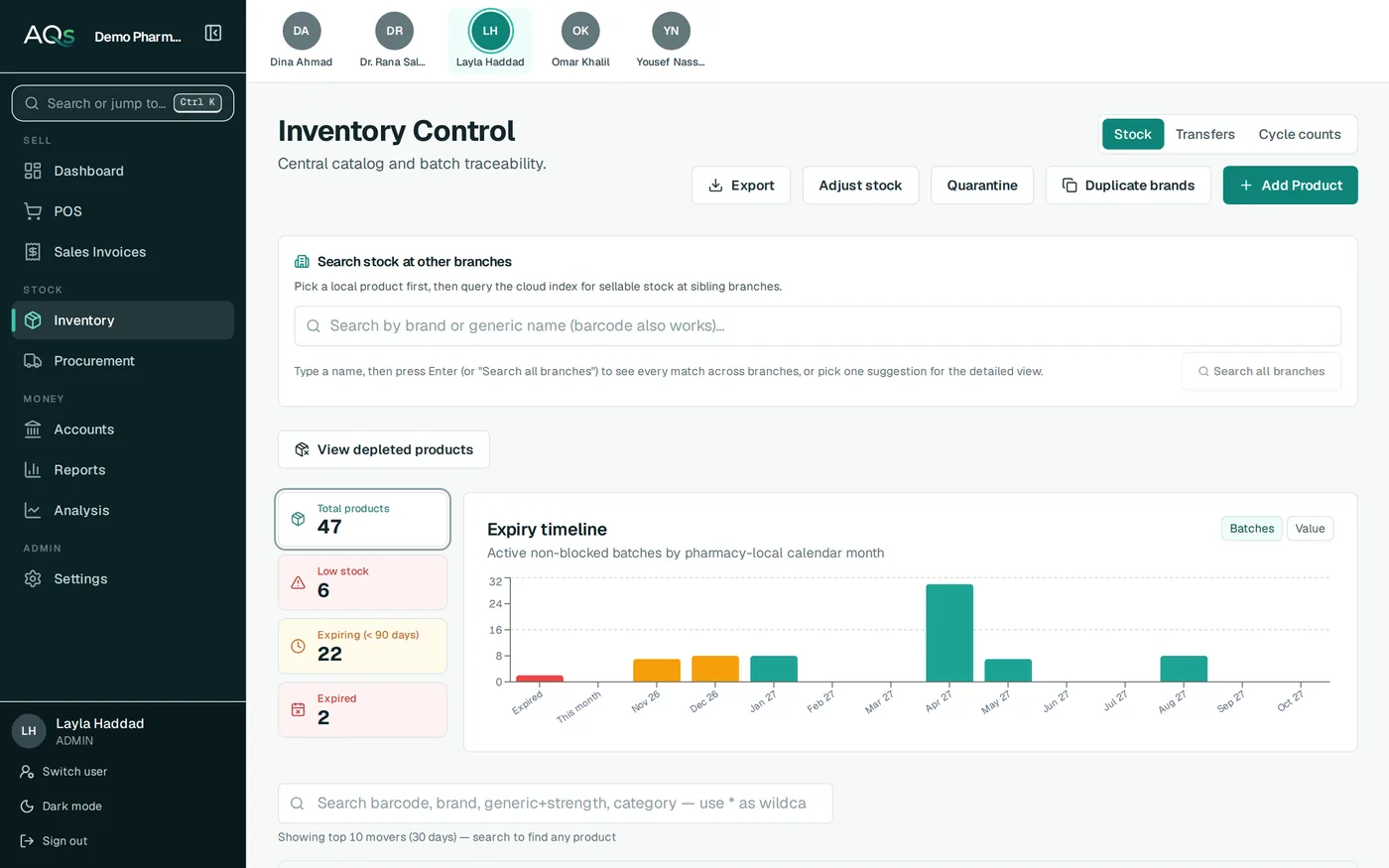
Every unit has a batch and an expiry date, and every movement has an author.
- Batch and expiry on every lot
- No negative stock
- Red, yellow, green expiry risk
- Expiry timelinePro: Available in Pro and up
- Quarantine and block
- Scheduled counts on a phonePro: Available in Pro and up
- Expired stock write-off
- Merge duplicates
- Quick countNewPro: Available in Pro and up
- Product data checkNew
Details: Inventory & expiry
- Batch and expiry on every lot
- Batch number and expiry date are required on every lot. The movement ledger records who, what, when and the quantity before and after.
- No negative stock
- Stock can't go negative. Two simultaneous checkouts can't oversell the same lot.
- Red, yellow, green expiry risk
- Each product is marked red, yellow or green by expiry risk, with low-stock and expiring filters on the Inventory screen.
- Expiry timeline
- A 14-bar timeline of expired stock, this month and the next twelve.
- Quarantine and block
- Quarantine or block a batch with a reason. It disappears from selling and from the stock figure shared with other branches.
- Scheduled counts on a phone
- Scheduled counts by category, supplier or letter range, a variance review before finalising, and a phone page that counts one item at a time by scanner or camera.
- Expired stock write-off
- Select expired batches and post one numbered write-off document that zeroes them and records the reason.
- Merge duplicates
- Merge duplicate products; every lot moves to the surviving product and nothing is summed into an existing lot.
- Quick count
- Scan a product, type the counted total and the system spreads it over the batches. No schedule needed, on the PC or a phone.
- Product data check
- A monthly check lists duplicates, missing tax rates, odd pack sizes and prices, and unlinked catalog items. Approve fixes in bulk and undo the last batch.
Procurement & AI invoice scan
From the order to the shelf, with the batch and expiry checked on the way in.
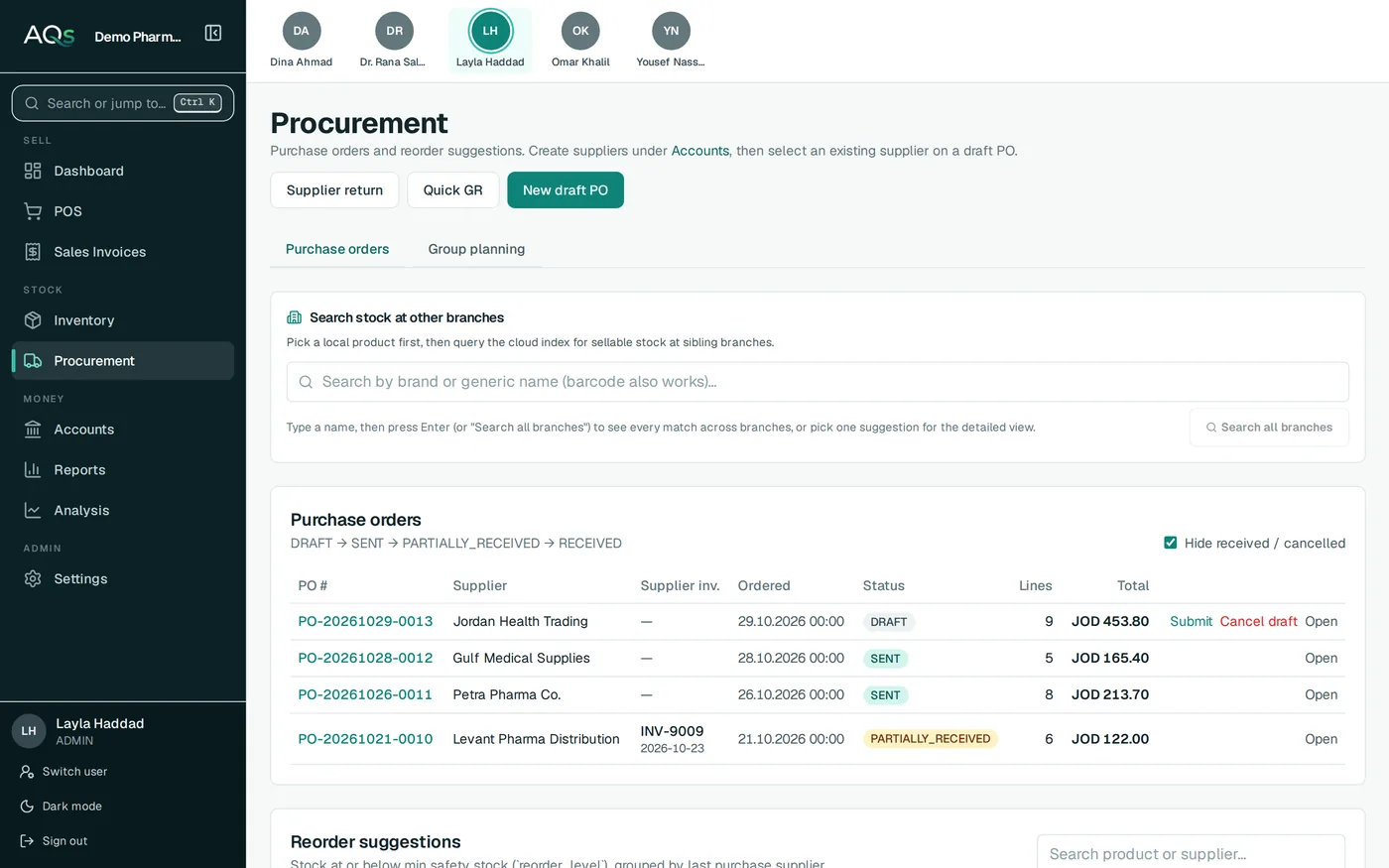
- Purchase orders
- Goods receipt with checks
- Reorder suggestionsNewPro: Available in Pro and up
- Cost and supplier pre-filled
- Receipt from ExcelPro: Available in Pro and up
- Supplier returns
- AI invoice scanAdvanced: Available in Advanced and up
Details: Procurement & AI invoice scan
- Purchase orders
- Purchase orders move from Draft to Sent, Partially received and Received. Open lines can be edited and drafts cancelled.
- Goods receipt with checks
- Goods receipt needs a batch number and expiry on each line and rejects expired stock. It handles free quantity, bonus and invoice discounts, VAT, and paid-now or due-on-a-date.
- Reorder suggestions
- Suggestions by reorder level or by how fast a product sells, each with the reason, the last supplier and cost, and a shortcut to a draft purchase order.
- Cost and supplier pre-filled
- Unit cost and supplier are pre-filled from the national catalog or the last price you paid, and stay editable.
- Receipt from Excel
- Upload a spreadsheet into a receipt. Rows that don't match a product are flagged until you link or create it.
- Supplier returns
- Return stock to a supplier and settle it as an account credit or a cash refund, with a numbered document.
- AI invoice scan
- Photograph or upload a supplier invoice and the AI drafts the receipt, linking product names it recognises. Nothing is posted until a person presses Apply and then posts the receipt.
Finance & insurance
Balances are always the sum of ledger rows, never a number someone typed.
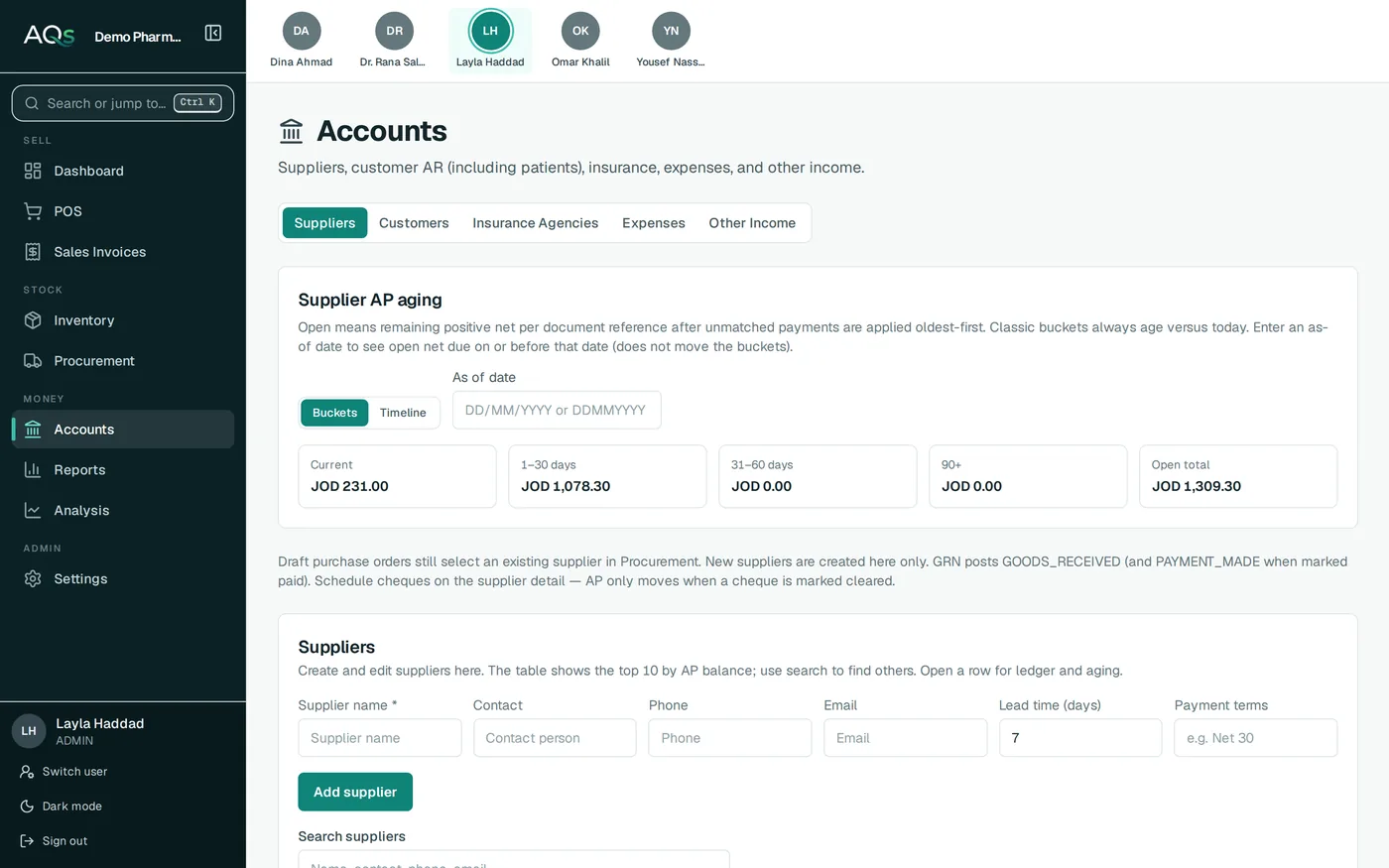
- Supplier ledger
- Post-dated chequesPro: Available in Pro and up
- Customer credit limits
- Corporate accountsPro: Available in Pro and up
- Insurance claims ledger
- Aging reportsPro: Available in Pro and up
- Tax split in reports
- Expenses and other incomePro: Available in Pro and up
- Items insurance doesn't coverNew
- Prices with or without taxNew
- Purchase invoices tax reportNewPro: Available in Pro and up
Details: Finance & insurance
- Supplier ledger
- A ledger per supplier covering goods received, goods returned, payments and adjustments, paid from the drawer, the owner's pocket or by cheque.
- Post-dated cheques
- Schedule post-dated supplier cheques and mark them cleared, bounced or cancelled. A bounced cleared cheque is reversed with a compensating entry.
- Customer credit limits
- Customer accounts with credit limits. On-account sales are charged to the account and blocked above the limit.
- Corporate accounts
- Corporate customer accounts alongside individual ones.
- Insurance claims ledger
- A claims ledger for each insurer: sales with an insurance share post a claim, and a recorded payment reduces what the insurer owes.
- Aging reports
- Aging by bucket or by due date, with the supplier timeline showing how much scheduled cheques cover.
- Tax split in reports
- Prices stay tax-inclusive; with tax calculation on, reports split net and tax, and the cart and receipt can show tax without changing the amount charged.
- Expenses and other income
- Record expenses, including recurring ones, and service income; they feed the net-profit figures.
- Items insurance doesn't cover
- Mark products or whole categories as not covered, or set exclusions per insurer. The cart shows each line as covered or not, and the patient pays the rest.
- Prices with or without tax
- Choose whether shelf prices include tax or tax is added at checkout. Each invoice keeps the mode it was sold with.
- Purchase invoices tax report
- Every received supplier invoice with VAT per rate, returns and branch transfers, ready to reconcile.
Reports & analysis
Daily close, margins and management figures from the same ledgers.
- Daily Z-report
- COGS and marginsPro: Available in Pro and up
- Management analysisPro: Available in Pro and up
- Twelve-month panelsPro: Available in Pro and up
- Stock movement ledgerPro: Available in Pro and up
- CSV and PDF export
- Invoice lookup and archive
- Reports centreNew
- Patient analysisNewPro: Available in Pro and up
- Shift variance cluesNewPro: Available in Pro and up
- Loyalty and promotion reportsNewPro: Available in Pro and up
- Ask AI about your figuresNewAdvanced: Available in Advanced and up
Details: Reports & analysis
- Daily Z-report
- A daily Z-report: sales by payment method, discounts, tax, insurance collected, on-account charged and the cash expected in the drawer.
- COGS and margins
- Cost of goods sold from each batch's purchase cost, plus gross margin by product and purchases by supplier.
- Management analysis
- Net revenue, gross profit, net profit, COGS and tax for any date range, month by month, with a sales trend and cashier performance.
- Twelve-month panels
- Twelve-month panels: expiry timeline, supplier aging timeline, monthly stock valuation, and revenue, expenses and net profit.
- Stock movement ledger
- A stock-movement ledger you can filter by action, date, user and batch.
- CSV and PDF export
- Regulatory reports export to both CSV and PDF; the inventory snapshot exports CSV (opens correctly in Excel) and PDF.
- Invoice lookup and archive
- Look up sales invoices by number or patient. Invoices past the retention period can be archived; archiving is a filter, not a delete.
- Reports centre
- All reports in one place, grouped by topic, with search in Arabic or English, favourites and the last ones you opened.
- Patient analysis
- Share of sales with a known patient, new and returning patients, a retention grid by month, adherence of chronic patients and sales by insurer.
- Shift variance clues
- When a closed shift is short or over, a panel lists possible causes with links to the invoices, returns or expenses worth checking. It suggests; it never blames a person.
- Loyalty and promotion reports
- Points earned, redeemed and expired, and for each batch promotion the packs sold, revenue and discount given.
- Ask AI about your figures
- An optional read-only assistant answers questions about sales, margins, stock and shifts from your own reports. No patient data is sent.
Patients, loyalty & WhatsApp
Know your regular patients, bring them back on time, and thank them.
- Patient recordsNewPro: Available in Pro and up
- Insurance card on fileNew
- Chronic medicationsNewPro: Available in Pro and up
- Refills dueNewAdvanced: Available in Advanced and up
- Loyalty pointsNewPro: Available in Pro and up
- WhatsApp in one clickNewPro: Available in Pro and up
- Automatic WhatsAppNewAdvanced: Available in Advanced and up
- Patients shared between branchesNewPro: Available in Pro and up
Details: Patients, loyalty & WhatsApp
- Patient records
- Phone, national ID, allergies and purchase history in one page, found by name, phone or insurance ID at the counter.
- Insurance card on file
- Insurer, member number, card expiry and the patient's coverage percentages. Coverage is applied automatically at checkout; an expired card is not.
- Chronic medications
- List each patient's regular medicines. Every sale records the dispense and works out the next refill date.
- Refills due
- Reports of refills due and overdue, adherence, and the stock you need for next month's chronic demand, with a card on the home screen.
- Loyalty points
- Patients earn points on what they pay and redeem them as a payment. Points expire oldest first, and returns reverse them.
- WhatsApp in one click
- Ready messages for thank-you and points, points about to expire and refill reminders, plus a daily list of who to message. The app opens WhatsApp; a person presses Send.
- Automatic WhatsApp
- The same messages sent automatically from the pharmacy's own WhatsApp Business number, with consent, quiet hours, delivery status and a STOP opt-out.
- Patients shared between branches
- With the patient's consent, their record, chronic medicines and points follow them to every branch of the group.
Multi-branch & cloud
Branches see each other's stock, and owners see the numbers, without any patient data leaving the pharmacy.
- Stock at other branchesPro: Available in Pro and up
- Branch transfersPro: Available in Pro and up
- Stock requestsPro: Available in Pro and up
- Group planningPro: Available in Pro and up
- Cloud sync
- Owner dashboardAdvanced: Available in Advanced and up
- One product list for all branchesNewPro: Available in Pro and up
- Transfer invoicesNewPro: Available in Pro and up
Details: Multi-branch & cloud
- Stock at other branches
- Search stock at sibling branches and see each one's quantity, nearest expiry and how fresh the data is.
- Branch transfers
- Transfers keep the batch number, expiry and purchase cost. Lines the system is confident about receive automatically; the rest need a pharmacist to confirm.
- Stock requests
- Ask another branch for stock; they fulfil it with a normal transfer. A history tab lists every transfer and request.
- Group planning
- Each branch uploads a nightly snapshot; the planner recommends moving stock that would expire before the sending branch can sell it, and builds a group purchase plan.
- Cloud sync
- The national catalog, licence and settings sync from the cloud every 6 hours and at startup. Cloud failures never block selling.
- Owner dashboard
- Aggregated daily figures go to the cloud every 20 minutes in operating hours. Owners and managers sign in with an email link and follow each branch on a phone. No patient data, invoice lines, barcodes, batch numbers or staff names are sent.
- One product list for all branches
- Names, barcodes, tax and retail prices sync between branches; stock, costs and promotions stay local. Let any branch edit, or only the main one, with the others sending suggestions.
- Transfer invoices
- A transfer can issue an official sales invoice at the sender and a purchase document at the receiver, with partial receipt and a credit note for rejected lines.
Compliance
Jordan's e-invoicing and the records regulators ask for.
- JoFotara clearance
- QR code on the receipt
- Controlled products
- Controlled-substance logPro: Available in Pro and up
- Compliance header on exports
- Five-year retention
- B2B invoices and credit notesNew
Details: Compliance
- JoFotara clearance
- When AQS enables JoFotara for your pharmacy, each completed sale is sent for clearance. The sale always saves first; if the service can't be reached, the invoice is kept and retried every 3 minutes.
- QR code on the receipt
- A cleared invoice stores its QR code, which prints on the receipt. Problems a person must fix, such as a missing seller tax number, show the reason and can be re-sent after fixing.
- Controlled products
- Flag products as controlled with a schedule from I to V. They always need a valid batch number at goods receipt, and their invoices are never archived.
- Controlled-substance log
- A controlled-substance log with patient, prescribing physician, product, schedule, batch, quantity and time.
- Compliance header on exports
- Z-report, COGS and controlled-substance exports carry a compliance header: pharmacy name, branch, licence number and responsible pharmacist.
- Five-year retention
- Sales invoices can't be archived inside a 5-year floor, and invoices with controlled substances stay on the active list permanently.
- B2B invoices and credit notes
- Sales to other pharmacies and branch transfers go to JoFotara as B2B invoices with the buyer's tax number; returns go as credit notes that reference the original.
Security & reliability
Built to keep working, and to show who did what.
- Roles and permissions
- Permission check on every action
- Hashed passwords and PINs
- Audit trail
- Daily backups
- One PC serves the counter
- Controlled updates
- Guided first run
Details: Security & reliability
- Roles and permissions
- Four base roles (Administrator, Pharmacist, Cashier, Inventory Manager) with per-user overrides over a capability matrix, including a numeric discount ceiling.
- Permission check on every action
- Every server action re-checks its own permission, reads included.
- Hashed passwords and PINs
- Passwords and PINs are stored hashed with bcrypt. Fast-PIN switching at a shared counter locks a user for 15 minutes after 5 wrong tries.
- Audit trail
- Stock movements, discounts, price overrides, batch overrides, goods receipts, backups and restores, cheque changes, invoice archiving and AI calls each write an audit row with the acting user.
- Daily backups
- A daily compressed backup (02:00 by default, kept 30 days) with optional encryption by passphrase. A restore needs you to type RESTORE and takes a snapshot first.
- One PC serves the counter
- One PC serves the whole counter over HTTPS on the local network; its certificate is generated and renewed automatically, even when the LAN address changes.
- Controlled updates
- Updates reach each pharmacy only when AQS's rollout policy approves that version, and you choose Restart now or Later.
- Guided first run
- On a new PC, the setup screen creates the first administrator, only while none exists, and shows a one-time recovery code.
Want to see it working?
Request a demo, or download the Windows installer.